Both the visitor/client and the gallery can cancel a booking easily should they need to. In both circumstance booking cancelation notification emails will be sent to both parties.
Visitor/client cancelations
Clients can now cancel their bookings. This reduces the time for a gallery to have to handle cancelations manually.
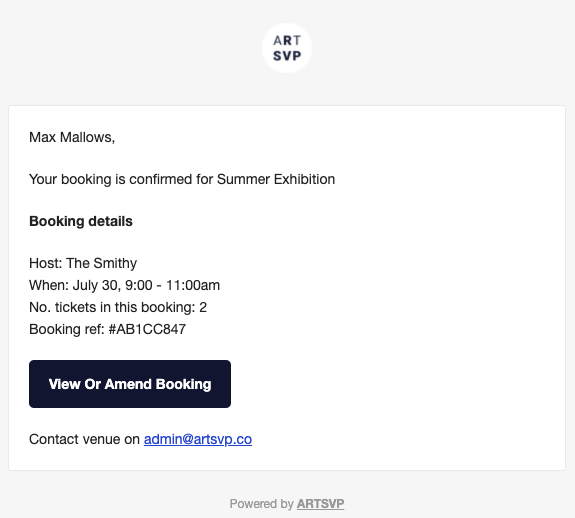
In both he booking confirmation and the reminder email there is a button saying "View or amend booking".
Gallery cancelations
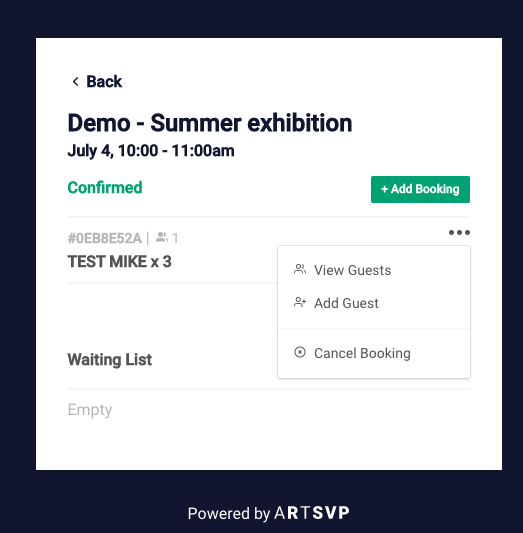
Galleries can also cancel bookings from their bookings page. Simply open the time slot and select the "•••" and the option to cancel will appear.
Automatic reminder emails sent to visitors
Reminder emails reduce no shows as well as promoting rearrangement of booking should that be needed.
We only ever send a maximum of 1 automatic reminder email per booking. This is sent 24hrs prior to the booking.
We don't send automatic reminders to bookings that are made close to the booked time slot. In the case that a booking is made within 36hrs of a booking slot we do not send reminder emails.
Grace period - Stop last minute bookings
Some users decide to prevent last minute booking. There are a couple reasons why some users decide this is helpful:
They do not want to be at the location if they do not have appointments. Blocking booking for an hour or two lets them travel to the location should a booking come in.
Some clients expect to see a familiar face. Blocking booking can provide the gallery with time to make sure those familiar faces are present at the location.
If you would like to add a "grace period" to your booking page, please get in touch.
Logo/image per booking page
Logos can be now be added to all premium booking pages.
If you want us to add or update the logo on a booking page just email the file to support@artsvp.co referencing the link to the booking page that it should be added to.
For best results please use a square logo that can fit in a circle. See and example how the logo is displayed here
Set maximum places per booking
Capacity of a gallery may be higher than the number of places/tickets that can be made in a single booking.
For example a gallery may have a capacity of 100 people per time slot but only allow groups of up to 5 people. In this case the capacity would be 100 and the maximum places per booking 5.
Show capacity but limit bookings
Some galleries have a set capacity but still only want to allow a certain number of bookings per time slot.
Here are two examples:
Gallery X only wants people from the same household per slot
Gallery sets capacity of 4 people per time slot but even if only 1 person is coming they want to block out that slot.
Gallery Y wants to have a member of staff allocated per booking
Gallery sets capacity at 10 but will only allow 2 bookings. In this case they could have a booking of 5 people and a single booking.
Visitor booking confirmation - variables
When a visitor books through ARTSVP they receive an email containing the following:
Name of event/exhibition/department they have booked.
Date and Time of booking
Number of tickets/people booked
Contact email of location should they need to cancel/change booking
They also receive some additional information that are customised per booking page. This can be configured on request currently and includes:
Link to more info Eg. to exhibition webpage or pdf press release.
(We do not include attachments in the email itself as this can effect deliverability.)
Visitor information - Eg. Please be advised the film screening starts 10 minutes after the start of the booking slot.
We're starting a changelog
Big news today, we're starting a public changelog so you're always
up to date with all the updates, improvements and fixes that are
made in ARTSVP.
Even though we work on ARTSVP all the time, sometimes
it may seem that not much is happening. This changelog is here to
improve that very important part of the communication between you and us.
Our customers always receive an update when we change something in the
widget on the user dashboard, or if needed all things we've changed is available on our
Galleries can now add the details of walk-in visitors directly to the system. This allows for the receptionist to keep a record and potentially grow the newsletter mailing list (should the visitor agree).
From the gallery's booking's view the gallery can add details in 2 ways.
Create a new booking and add the details of the lead visitor. Then they can also add guests to that booking. This will email the client with a booking confirmation (which may include links to the exhibition notes, visitor guidelines etc.)
Add a visitors details to an existing booking. This is useful in the case where a group of friends come on a single booking but some of them want to be added to the mailing list. Added guests will not be sent an email.
A couple notes on how adding bookings impacts availability within a slot.
Galleries can add as many customer details to a time slot. This means they can add more than the publicly available amount to book.
When galleries add details it will reduce the amount of available spaces that can be booked.